Have Any Question? Get Intouch
+256 (0) 755 196 859
elearning@iscg.ac.ug
Register Login

Login with your site account

No apps configured. Please contact your administrator.

Lost your password?

Not a member yet? Register now

International School of Christian GrowthInternational School of Christian Growth
  • Home
  • Courses
    • Level One
    • Level Two
    • Level Three
    • Level Four
    • Level Five
    • Level Six
    • Level Seven
    • Level Eight
  • About Us
  • Blog
  • Contact
    • Home
    • Courses
      • Level One
      • Level Two
      • Level Three
      • Level Four
      • Level Five
      • Level Six
      • Level Seven
      • Level Eight
    • About Us
    • Blog
    • Contact

    Level One

    • Home
    • All courses
    • Level One
    • Power Pivot Tools Data handling

    Power Pivot Tools Data handling
    etask
    Level One
    Free
    power-bi-feb
    • Overview
    • Curriculum
    • Instructor

    Using Power Query to Get Data

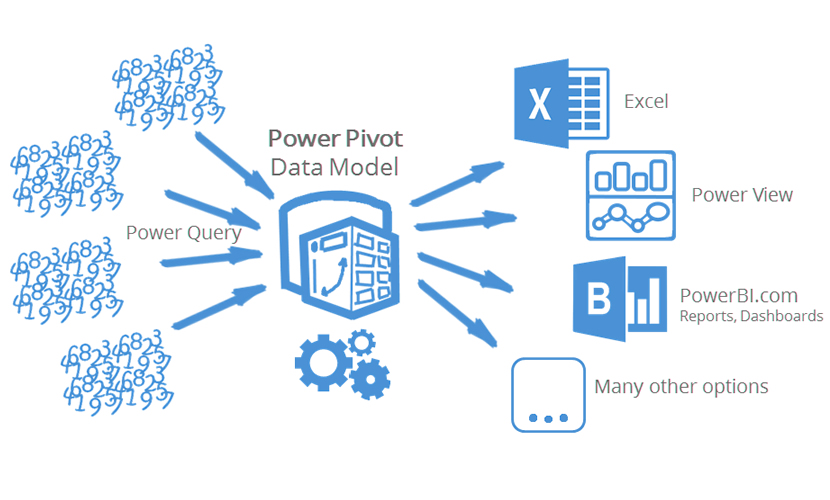
    Data is everywhere. For example, if you run a website, you’re collecting data continually and you may not even know it. Every visit to your site generates information that is stored in a file on your server. In the same way, every system in an organization collects data and stores it. And, of course, some other data is also collected and stored manually in different file formats. These files contain lots of useful information, if you know how to import them and merge them into Excel.This lesson equips you with the ways to get data into a worksheet and provides some tips to help you clean it up.

    Data Modelling with Power Pivot

    Power Pivot Data Modelling enables you to import millions of rows of data from multiple data sources into a single Excel workbook. It allows you to import data from multiple sources into one single source workbook without having to create multiple source sheets that suffer from version control and transferability issues. In this lesson, you will learn how to model your data, create relationships between heterogeneous data, create calculated columns and measures.

    Enhancing Power Pivot with Pivot Tables and Pivot Charts

    In this lesson, you will `learn how to use Power Pivot to build PivotTables, Pivot Charts and KPIs then further analyse the data so that you can make timely business decisions without requiring IT assistance to run multiple queries on your Database. A Key Performance Indicator (KPI) is designed to help evaluate the current value, status, and trend of a metric.

    Expanding the Data Model in Power Pivot

    In this lesson, you will learn how to view and create hierarchies from table columns in Diagram View.You will also learn how to build a PivotTable in Excel that combines data from multiple tables, how import data, how use the Power Pivot add-in to refine the data model that lives behind the report, and how to add calculations, hierarchies, and optimizations for Power View reporting.

    Course Features

    • Lectures 1
    • Quizzes 0
    • Duration 30 hours
    • Skill level Beginner
    • Language English
    • Students 1
    • Certificate No
    • Assessments Yes
    CoursesLevel OnePower Pivot Tools Data handling
    • Data Handling in Access And Power Pivot 0/0

      • Lecture1.1
        How to Import Data from Access to Power Pivot 10 min
    etask
    • Overview
    • Curriculum
    • Instructor
    Free
    • Share:

    You May Like

    Introduction To Microsoft Excel Read More
    Arinaitwe Aurther

    Introduction To Microsoft Excel

    0
    $190.00
    Introduction to Data Analysis Expressions Read More
    etask

    Introduction to Data Analysis Expressions

    0
    $280.00 $250.00
    Programming Microsoft Office Excel Read More
    etask

    Programming Microsoft Office Excel

    1
    $280.00 $250.00
    Power BI and Power BI Tools Read More
    etask

    Power BI and Power BI Tools

    25
    $200.00 $190.00

    Course Levels

    LEVEL ONE
    LEVEL TWO
    LEVEL THREE
    LEVEL FOUR
    LEVEL FIVE
    LEVEL SIX
    LEVEL SEVEN
    LEVEL EIGHT

    Latest Courses

    Power BI and Power BI Tools

    Power BI and Power BI Tools

    $200.00 $190.00
    Power Pivot Tools Data handling

    Power Pivot Tools Data handling

    Free
    Programming Microsoft Office Excel

    Programming Microsoft Office Excel

    $280.00 $250.00
    International School of Christian Growth P.O Box 70865 , Kampala, Uganda. Gaza-land Building, Floor 7, Room L7-780 Plot 22A, William Street, Kampala (U)

    +256 (0) 414 581 053

    +256 (0) 776598 575

    iscgjwtl@gmail.com

    info@iscg.ac.ug

    Company

    • About Us
    • Blog
    • Contact

    Links

    • Courses
    • FAQ

    Social Media

    • Facebook
    • Twitter
    • Linkedin

    Course Levels

    LEVEL ONE
    LEVEL TWO
    LEVEL THREE
    LEVEL FOUR

    © 2020 All rights reserved By International School of Christian Growth Powered by Roll Solutions.

    • Privacy
    • Terms
    • Sitemap

    Become An Instructor?

    Join thousand of instructors and earn money hassle free!

    Get Started Now